


China Best USB Charging Cable Supplier for Global Buyers?
A dependable Usb Charging Cable supplier matters when buyers need consistent charging, safe power delivery, and predictable shipment quality. Demand sits within a vast connected-device market. GSMA’s The Mobile Economy 2024 reported 5.6 billion unique mobile subscribers worldwide at the end of 2023. That figure does not measure cable sales, but it shows the scale of the device ecosystem cables must serve. Small failures still matter: a loose connector, unstable charging, or unclear specifications can disrupt retail reviews and repeat orders.
For technical evaluation, the USB Implementers Forum’s USB Type-C Cable and Connector Specification and USB Power Delivery specifications provide authoritative reference points. Buyers should check connector type, supported power, data capability, materials, testing records, and labeling—not rely on “fast charging” claims alone. Market research, including Grand View Research’s USB Cable Market analysis, can help identify broader product and demand trends. Still, forecasts are not supplier audits. Ask for traceable test documentation, sample cables, production tolerances, and clear defect-handling terms. Then compare sample performance with the final production lot. This step is easy to overlook.
A strong supplier should explain what each cable can—and cannot—do. That honesty is useful. Global buyers may also need different lengths, packaging, and delivery schedules, so confirm these details before placing a large order. No supplier is perfect, and a polished catalog proves little on its own. The better choice is a manufacturer whose specifications, evidence, and communication remain consistent from sample approval to shipment.
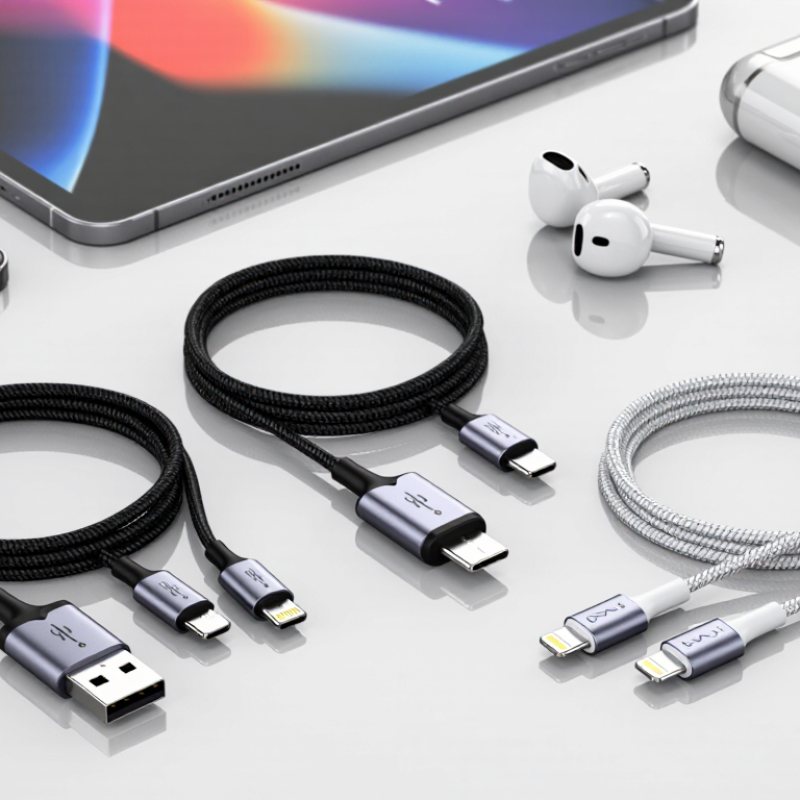
How USB Charging Cables Are Designed and Classified
A USB charging cable is designed around three choices: connector shape, electrical capacity, and data capability. Common classifications include USB-A-to-C, C-to-C, and older Micro-USB designs. Yet connector shape alone does not reveal charging speed. A cable’s conductor size, length, insulation, and contact quality affect resistance and heat. In factory checks, technicians may measure voltage drop under load and inspect crimped ends for loose strands. Small details matter. A cable that looks sturdy can still perform poorly.
USB-IF’s USB Power Delivery 3.1 specification defines Extended Power Range operation up to 240 watts, while the USB Type-C specification sets requirements for compatible cable assemblies. Higher-power designs may need an electronic marker chip to identify their capabilities. Data classifications also vary: some cables carry power only, while others support defined data rates. These are separate features. Buyers should check both the power rating and the data specification, rather than relying on a Type-C plug or packaging claim. One point is easy to overlook: a longer cable can increase resistance, so its stated wattage does not guarantee identical performance in every setup. Specifications help, but testing the finished cable remains essential.
China Best USB Charging Cable Supplier for Global Buyers? - How USB Charging Cables Are Designed and Classified
| Classification Dimension | Cable Type or Design | Typical Construction or Capability | Design and Sourcing Considerations | Useful Verification |
|---|---|---|---|---|
| Connector combination | USB-A to USB-C | USB-A plug at the host end and reversible USB-C plug at the device end. Commonly used with USB 2.0 data connections. | Charging performance depends on the power source, cable design, and device. The USB-C plug alone does not indicate USB Power Delivery support. | Check connector fit, wiring, rated current, and compatibility with the intended charger and device. |
| Connector combination | USB-C to USB-C | Reversible USB-C plugs at both ends. Cable capabilities can range from USB 2.0 data to higher-speed USB data, depending on construction and specification. | Confirm separately the supported data rate, charging current, and charging protocol. Not every USB-C cable supports every USB-C feature. | Check cable markings, product documentation, and applicable USB-IF certification records where relevant. |
| Connector combination | USB-A to Micro-USB or USB-A to USB-B | Legacy connector combinations still used with some accessories, peripherals, and older devices. | Specify the exact connector shape and orientation. These cable types do not provide USB-C Power Delivery through their legacy connectors. | Inspect connector dimensions, pin assignment, and compatibility with the target device. |
| USB data capability | USB 2.0 data cable | Supports data signaling up to 480 Mbit/s under the USB 2.0 specification; actual transfer rates depend on connected devices and conditions. | A cable may support charging without being designed for high-speed data. State charging and data capabilities separately. | Review the declared USB specification and test data transfer with compatible equipment. |
| USB data capability | SuperSpeed USB cable | Designed for USB data rates above USB 2.0, with capabilities dependent on the applicable USB generation and cable configuration. | Higher data rates require suitable cable construction and compatible host and device ports. Length and signal integrity can affect performance. | Confirm the exact supported USB data rate and use a suitable compliance or signal-integrity test process. |
| Charging capability | USB-C cable rated for up to 3 A | Many USB-C cables support up to 3 A when used with compatible equipment and within the applicable USB Type-C requirements. | Charging power is determined by the complete system, including the power source, cable, charging protocol, and receiving device. | Check the declared current rating and verify operation with the intended charger and device combination. |
| Charging capability | USB-C cable rated for up to 5 A | Higher-current USB-C operation requires a suitable electronically marked (e-marked) cable and compatible equipment. | Do not infer a 5 A rating from connector appearance. Confirm the cable’s electronic marking and stated power capability. | Verify e-marker information and applicable USB Power Delivery capability using appropriate test equipment. |
| Power delivery | USB Power Delivery (USB PD) capable cable | USB PD is a power negotiation protocol used with compatible USB-C sources, cables, and devices. Supported voltage and power depend on the specific combination. | A cable advertised as USB-C is not automatically a USB PD cable. Specify the supported current and power profile rather than relying on a generic label. | Test with compatible USB PD analyzers and confirm product documentation matches the actual cable configuration. |
| Conductor design | Copper power and data conductors | Insulated conductors carry power and, where included, data signals. Conductor size and layout affect resistance, flexibility, and electrical performance. | Request conductor material and construction details. Lower resistance can help reduce voltage drop, especially in longer or higher-current cables. | Review material declarations and measure electrical resistance and voltage drop against agreed requirements. |
| Shielding design | Shielded data cable | May use foil, braid, or a combination of shielding to help control electromagnetic interference in supported designs. | Shielding needs to be appropriate to the cable’s data capability and termination design. More shielding does not by itself prove compliance or performance. | Check construction drawings and test the completed cable for required electrical and data performance. |
| Outer jacket | PVC, TPE, or braided jacket | PVC and TPE are common jacket materials; braided constructions typically add an outer textile layer over an inner cable jacket. | Compare flexibility, surface feel, abrasion resistance, and environmental requirements. A braided exterior does not establish electrical capability. | Request material specifications and perform agreed abrasion, bend, and environmental tests. |
| Mechanical design | Reinforced strain relief | Molded or otherwise reinforced transitions at the plug ends can help reduce stress where the cable meets the connector. | Prioritize consistent molding, secure connector assembly, and a design suited to the expected bending and handling conditions. | Use repeatable bend, pull, and connector-retention tests with documented acceptance criteria. |
| Length and application | Short, standard, or extended cable | Common product lengths vary by application. Increasing cable length can increase electrical resistance and may affect high-speed signal performance. | Choose length based on the installation and required charging or data capability. Validate the longest intended configuration. | Test voltage drop, charging behavior, and data performance at the specified production length. |
| Supplier evaluation | Production and quality-control review | Relevant checks can include material control, connector inspection, electrical testing, traceability, and production consistency. | Provide a written specification covering connector type, length, current, data rate, materials, labeling, and packaging before sampling or production. | Review sample results, test reports, inspection criteria, and batch traceability. Verify any claimed certification independently. |
Note: Cable performance depends on the cable, power source, connected device, and applicable USB specification. Confirm requirements for each intended combination before ordering.